


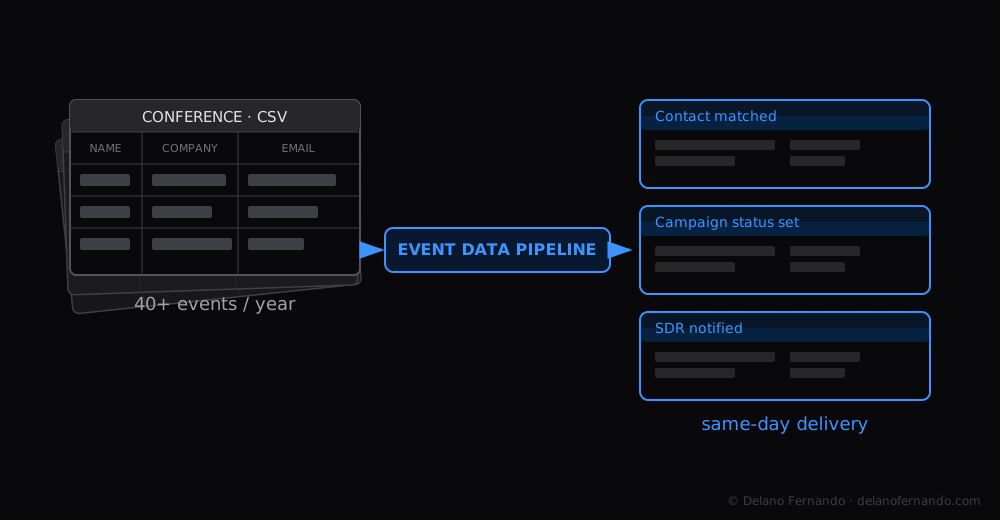
The first thing to understand about event data is that it looks simple and is not.
Event data automation marketing has a reputation for being solved. It is not.
You have an attendee list. You want the people on it to end up in your CRM with the right campaign status, the right nurture enrollment, and the right rep notified. Straightforward.
Except: the spreadsheet format changes every event. The contact matching is fuzzy. The CRM has duplicates. The campaign status labels do not match what the operations team agreed on six months ago. The nurture enrollment has a re-enrollment bug that does not surface until week three. And the SDR who should have received the alert was on leave and nobody updated the routing.
This is what event data looks like in practice.
Why event data automation stays broken at most companies
Most companies keep their event data process manual because fixing it seems harder than living with it. The pain is distributed: ops spends two days on it, sales waits three days for the data, the CMO sees attribution that is three weeks stale.
Nobody owns the full picture. Nobody’s incentive is to rebuild the whole thing.
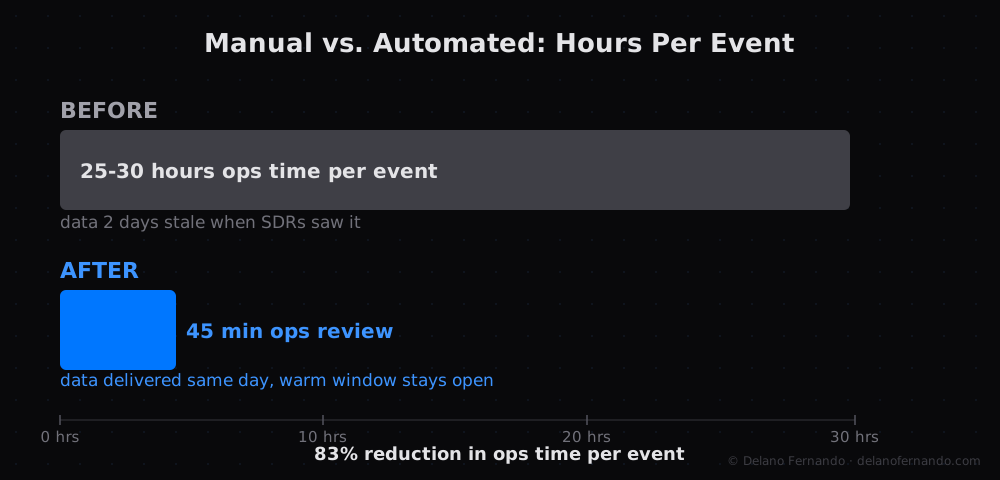
The client we worked with was running 40+ events per year: conferences, executive dinners, partner booths. After each one, the ops team spent 25 to 30 hours per event on manual reconciliation. By the time the data reached SDRs, it was two days stale and the warm-conversation window had closed.
What the pipeline actually does
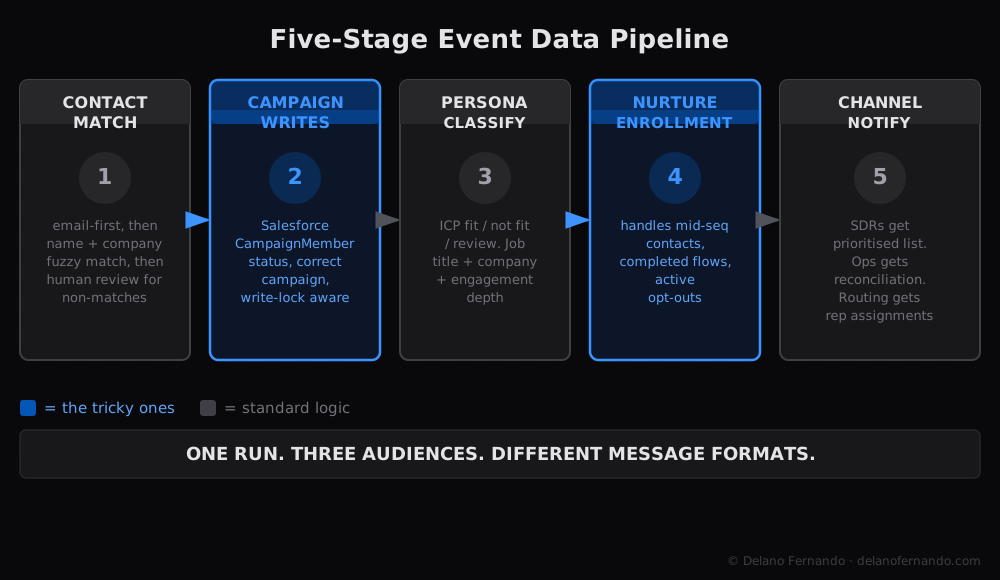
The rebuilt pipeline handles five things that previously required five separate manual processes. The event attendee data processing runs end-to-end without a human touching a spreadsheet.
Contact matching and deduplication. The event spreadsheet rarely arrives with clean data. Names are misspelled. Emails are personal rather than work. Company names have variants. The pipeline matches against CRM records using email first, then name-plus-company fuzzy matching, then flags non-matches for human review rather than creating duplicates.
Campaign membership writes. Every matched contact gets a Salesforce CampaignMember record, the object that tracks a person’s attendance status, with the correct status for that event. This sounds simple. In practice, it requires the right campaign to exist in Salesforce, the right statuses to be configured, and a write sequence that respects the CRM’s record-locking behaviour under concurrent updates.
Persona classification. Before routing to an SDR, the pipeline classifies each attendee: ICP match, not a fit, or requires review. The classification uses job title, company signals, and engagement depth. SDRs only receive contacts that have passed a minimum threshold.
Nurture enrollment. Contacts who are not ICP fits but showed genuine interest go into product nurture sequences. The enrollment logic has to handle contacts who have already completed a nurture flow, contacts who are currently mid-sequence, and contacts with active opt-outs.
Channel-specific notifications. Three Slack channels receive different messages after each event: SDRs receive a prioritised list with Outreach filter links, marketing ops receives a reconciliation summary, and the routing channel receives individual rep assignments. One run, three different message formats for three different audiences.
What breaks if you get it slightly wrong
The most expensive mistake we made in the first build was getting the nurture enrollment timing wrong.
The enrollment fired before the campaign status writes were confirmed in Salesforce. In a small percentage of cases, Salesforce had not yet reflected the new status when the enrollment check ran. Some contacts ended up in nurture who should have been in the SDR queue.
Not catastrophically wrong. Just slightly wrong, in a way that took two weeks to diagnose because the failure mode was intermittent.
The fix was a confirmation check: wait for the Salesforce writes to complete and verify them before triggering downstream steps. It added about 90 seconds to the pipeline runtime. It eliminated the timing issue entirely.
Build explicit confirmation steps into any pipeline that has downstream dependencies on upstream writes. Do not assume that a write that succeeded will be reflected immediately in a subsequent read. The same data-timing issue surfaces in lead routing: stale field values in HubSpot cause routing decisions that look correct on paper but operate on outdated state.
What it looks like at steady state
The pipeline now runs within four hours of each event spreadsheet arriving. Ops reviews the match exceptions, approves the classification, and releases the run. Total hands-on time per event: 45 minutes to an hour, down from 25 to 30 hours.
SDRs receive the data the same day as the event in most cases. The warm-conversation window stays open.
The full technical detail is in the Event Data Pipeline and SDR Routing case study. If your event data is a known problem, let’s talk.