


Most AI support bots answer the same twelve questions. The problem is they answer them twelve different ways. The customer who asked version nine of a question gets a different answer than the customer who asked version three of the same question. That inconsistency is invisible in demo conditions and expensive in production.
The fix is not a better AI model. It is a different architecture.
Why AI customer support automation underperforms when it is deployed as a search engine
The first generation of AI customer support automation tools were essentially knowledge base search with a conversational interface. Give them a query, return the most relevant document. It is a reasonable first move. The problem is it only works for simple, direct questions with a single correct answer.
It fails for compound questions. It fails for questions that require context about the customer’s plan, account status, or history. And it fails for questions where the correct answer is genuinely “it depends,” because a search-style system returns something confident and wrong rather than something honest and partial.
The inconsistency problem compounds this. When the same question is phrased slightly differently across a thousand customers, a retrieval-based system surfaces different source documents and produces different answers. Those answers are not wrong in an obvious way. They are wrong in a way that takes weeks to detect, usually when a customer escalates and mentions what the bot told them last time.
The triage problem
Triage, in this context, means the process of classifying incoming requests by urgency and routing them to the right resolution path. It is the part of support automation that most AI pilots skip. They focus on what the bot can answer. They do not design for what it cannot.
This creates a specific failure mode: the customer who tried the bot, got a bad answer, and arrives at human support angrier than if they had contacted directly. Support teams call this the double-handle problem. The AI bot handled it first. Then a human had to handle it again. With a frustrated customer who no longer trusts the process.
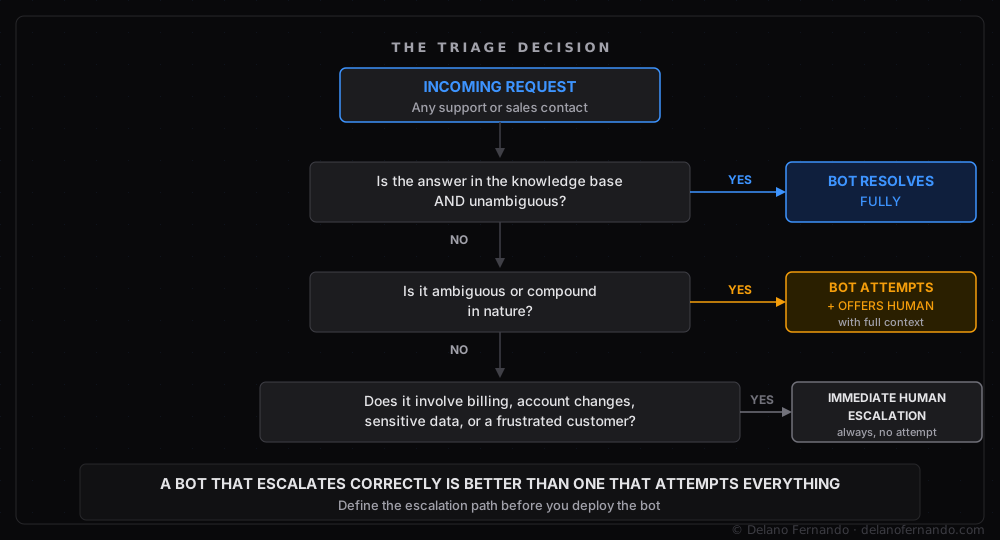
The triage logic is what separates a bot that genuinely reduces team workload from one that adds a new category of escalation. It requires deciding, before deployment, which tickets the bot resolves fully, which ones it attempts with a handoff offer, and which ones it routes immediately to a human without attempting an answer at all. Getting the routing logic right is hard even in dedicated routing systems — this breakdown of a broken lead routing setup illustrates how the logic can look correct while the data underneath it does not.
Billing disputes. Account changes. Anything involving sensitive data. Customers who are already expressing frustration. These need to reach a human immediately, with the bot’s job being to capture context, not attempt resolution.
A bot that overreaches destroys the trust the bot was meant to build.
What the system looks like when it is working
The case behind this post involved two separate bots, each with a precisely defined job.
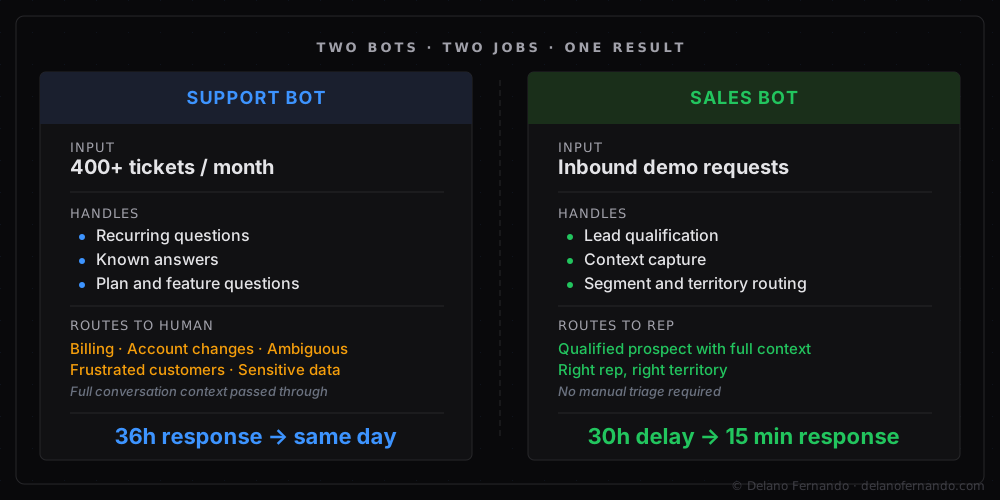
The support bot was built to handle recurring, answerable questions against a defined knowledge base. Feature questions, how-to questions, plan comparison questions. When a question arrived that was ambiguous or compound, it did not attempt an answer. It offered a handoff to a human and passed along the full conversation as context, so the rep was not starting from scratch. Billing questions, account changes, anything requiring a judgment call: immediate escalation, no attempt.
The team was processing 400-plus tickets per month with an average response time of 36 hours. Most of those tickets were the same 15 to 20 questions in various forms. After deployment, the questions the bot could handle were resolved the same day. The tickets reaching human agents were the ones that actually needed them. Average human response time improved because the volume the humans were handling had dropped and the remaining tickets were better qualified.
The sales bot had a completely different scope. Inbound demo requests were sitting for more than 30 hours before a rep picked them up. By then, the contact’s attention had moved elsewhere. The bot qualified incoming requests, captured context about the prospect’s use case and company size, and routed to the right rep based on territory and segment. Response time on inbound went from more than 30 hours to under 15 minutes.
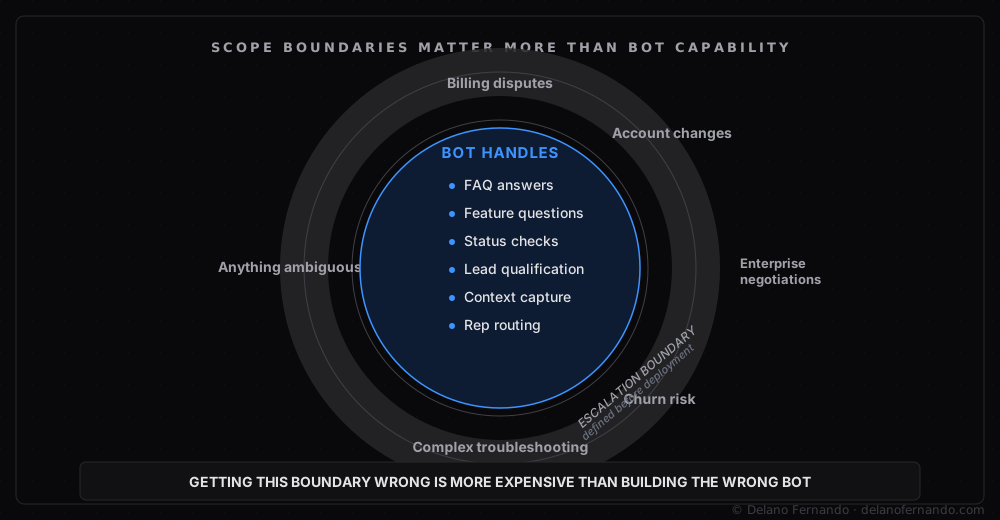
Neither bot was trying to do everything. Both knew their scope precisely. Getting those scope boundaries right took longer than building the bots. What runs underneath to enforce them involves several interlocking classifiers and routing rules that each have their own failure modes. The short version is: if the scope boundary is wrong, the bot is confidently wrong at scale.
The lesson
AI customer support automation works best when it is scoped narrowly and escalates gracefully. A bot that handles 70 percent of tickets correctly and escalates the other 30 percent with full context is a better outcome than one that attempts everything and handles 40 percent correctly.
The metric most teams optimize for is deflection rate, meaning the percentage of tickets the bot resolves without human involvement. Deflection rate is the wrong primary metric. It does not distinguish between a ticket the bot resolved well and a ticket the customer gave up on. The metric that matters is resolution quality on bot-handled tickets and escalation quality on the ones it passes through.
Design the escalation path before you deploy the bot. Define the boundary before you build toward it. The broader principle — that consequential automation requires explicit quality gates and escalation paths, not just a happy path — applies across the full ops stack, as covered in what 150+ automated workflows taught me about building systems that hold.
The full technical detail is in the AI-Powered Support and Sales Bots case study. If you are evaluating AI support automation, let’s talk.